
Developer docs
Koru's built-in MCP server
Koru ships an MCP server, koru-mcp, next to the app on Windows, macOS and Linux. An MCP client such as Claude starts it as a local process and reads and edits your Koru documents through it. There is no plugin to install and no API key: the server talks only to Koru on your own computer.
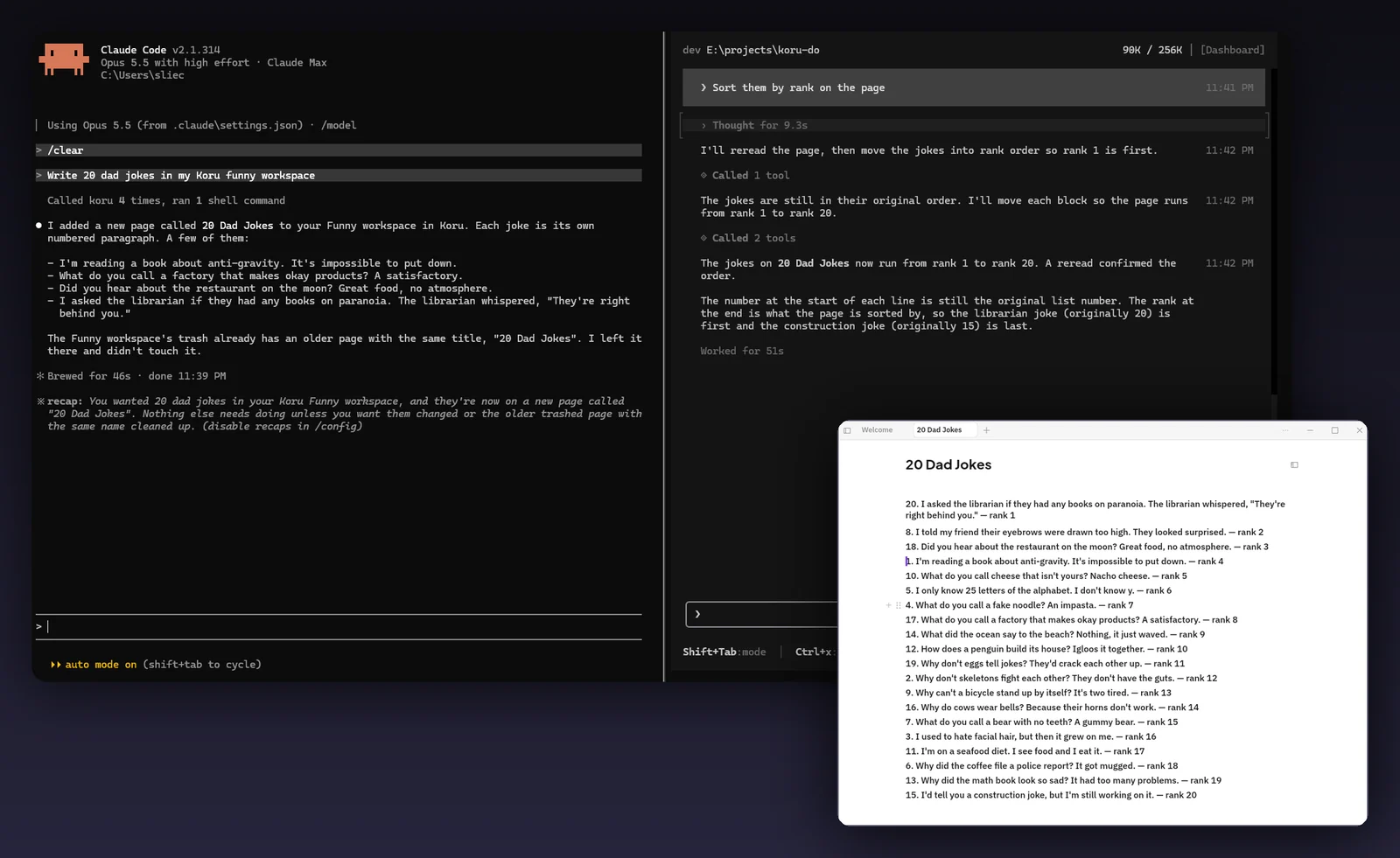
The server is a small executable, koru-mcp (koru-mcp.exe on Windows), installed beside Koru. It speaks MCP over standard input and output: your MCP client launches koru-mcp serve --stdio as its own child process and stops it when it disconnects. While it serves, stdout carries only MCP messages and diagnostics go to stderr and a log file.
The bridge does not open your files itself. It forwards each tool call to Koru on the same computer, which answers from your local database, applies edits through the same model the app uses, and only reports success once the change is saved.
Koru is native, not Electron, and open source under MPL-2.0, so you can read every line of this server on GitHub.
Koru puts the exact command for your installation on its Welcome page. You paste it into Claude, and that is the whole setup. Nothing is installed inside Koru, no key is generated, and no certificate has to be trusted.
In Claude Code it is one command. Claude Desktop has no command for local servers, so there you add one entry to Claude's own config file.
- Install Koru and open it: 0.1.3 or later on Windows, 0.1.4 or later on a Mac. On a Mac, move Koru.app to Applications first instead of running it from the DMG, and open Koru once before you connect Claude. On Linux, extract the tar.gz into a folder of its own.
- On the Welcome page, find the row "Manage documents over MCP" and click Copy (clicking the command itself copies it too). The row is in Koru for Windows from 0.1.3 and for Mac from 0.1.4; on an older Koru, use the paths below.
The command is the full path to koru-mcp beside your Koru app, followed by serve --stdio, for example "C:\path\to\Koru\koru-mcp.exe" serve --stdio. A path containing a space is wrapped in quotes. On macOS the bridge is inside the app bundle, at /Applications/Koru.app/Contents/MacOS/koru-mcp. On Linux it is koru-mcp in the folder you extracted Koru into, for example /home/you/koru/koru-mcp.
- In a terminal, type
claude mcp add koru --and paste the command after it. - Run
claude mcp list(or/mcpinside a Claude Code session) and check thatkorushows as connected. - Start
claudeand ask it to use Koru, for example: "Use Koru's get_documentation tool for koru://docs/model, then list my Koru workspaces and documents."
claude mcp add koru -- "C:\path\to\Koru\koru-mcp.exe" serve --stdioclaude mcp add koru -- /Applications/Koru.app/Contents/MacOS/koru-mcp serve --stdioclaude mcp add koru -- /home/you/koru/koru-mcp serve --stdioThe -- separates Claude Code's own options from the command that starts the server. claude mcp add stores the server for the current project by default; add --scope user before koru to have it in every project.
- Open Claude Desktop's config file,
claude_desktop_config.json. On Windows it is%APPDATA%\Claude\claude_desktop_config.json; on macOS it is~/Library/Application Support/Claude/claude_desktop_config.json. - Add a
koruentry undermcpServers. Put the path from the copied command incommand, without the surrounding quotes and with every backslash doubled (on macOS,/Applications/Koru.app/Contents/MacOS/koru-mcpas it is), andserveand--stdioinargs. Merge it with any servers already there; JSON allows no trailing commas or comments. - Quit Claude Desktop completely, including its icon in the notification area or menu bar, and open it again. Claude starts and stops the bridge itself.
- Click the + button under the chat box and choose Connectors to check that Koru and its tools are listed, then ask Claude to read or edit a Koru document.
{
  "mcpServers": {
    "koru": {
      "command": "C:\\path\\to\\Koru\\koru-mcp.exe",
      "args": ["serve", "--stdio"]
    }
  }
}{
"mcpServers": {
"koru": {
"command": "/Applications/Koru.app/Contents/MacOS/koru-mcp",
"args": ["serve", "--stdio"]
}
}
}On Windows you can check the file is valid JSON before restarting Claude with Get-Content "$env:APPDATA\Claude\claude_desktop_config.json" -Raw | ConvertFrom-Json in PowerShell.
Obsidian has no MCP server of its own. The common routes go through the Local REST API community plugin, which now includes an MCP endpoint, or through a separate server such as mcp-obsidian that calls that plugin. This is what their own READMEs ask for, next to what Koru asks for.
| Topic | Koru | Obsidian, Local REST API plugin | Obsidian, mcp-obsidian |
|---|---|---|---|
| Inside the notes app | Nothing to install: the server ships with Koru | Install and enable the Local REST API community plugin | The same plugin, plus the mcp-obsidian server |
| Credential | None. The server only reaches Koru on your computer | API key from the plugin settings, sent as a bearer header | API key from the plugin settings, in the server's env |
| Transport | stdio, started by the client | Streamable HTTP at https://127.0.0.1:27124/mcp/ with a locally generated certificate to trust, or a plain HTTP port you enable | stdio, calling the plugin's REST API |
| Claude Code | One command: claude mcp add koru -- <command> | One command with --transport http and an --header carrying the key | The README documents a JSON config entry |
| Claude Desktop | One entry in claude_desktop_config.json | One entry that runs mcp-remote through npx (needs Node.js) with the key header | One entry that runs uvx (needs Python 3.11+ and uv) with the key in env |
| Notes app must be open | No. The bridge starts Koru's background service if it is not running | Yes, the server runs inside Obsidian | Yes, it calls the plugin running inside Obsidian |
To be fair to Obsidian: the Local REST API plugin exposes things Koru's server does not, such as running Obsidian commands, deleting, moving and copying files, event streams and uploads through signed URLs.
Checked on October 30, 2026 against:
Any MCP client that can launch a local stdio server can use the same command. Koru's repository documents these:
codex mcp add koru -- "C:\path\to\Koru\koru-mcp.exe" serve --stdio[mcp_servers.koru]
command = "C:\\path\\to\\Koru\\koru-mcp.exe"
args = ["serve", "--stdio"]ChatGPT desktop: Settings, MCP servers, Add server, choose STDIO, then enter the path as the command and serve --stdio as the arguments, and restart ChatGPT.
The bridge also takes --tool-pages on|off. Off (the default) answers tools/list in one reply; on splits it into pages under 7,000 bytes for clients that follow MCP pagination.
Every tool publishes a title, a description, an input schema and MCP safety hints. Read-only tools publish readOnlyHint: true; every tool publishes openWorldHint: false. No tool publishes an output schema, but every result is a JSON object in structuredContent, and a failure is { code, message, details? } with isError set. Request objects reject unknown fields.
IDs are UUID strings. A field marked ? is optional.
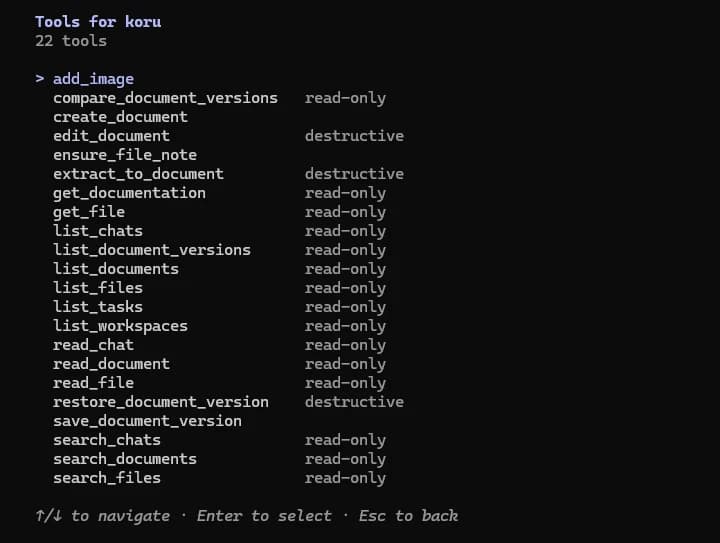
get_documentationRead only
Returns the full model and editing contract, koru://docs/model, for clients that cannot read MCP resources. Read it before the first change.
- Inputs
- uri (only koru://docs/model)
- Result
- { uri, mime_type, text }
- Hints
- readOnlyHint
list_workspacesRead only
Lists the Koru workspaces this connection can reach.
- Inputs
- none
- Result
- { workspaces: [{ id, owner, name, created_at, last_opened_at?, icon?, color?, pinned, archived, deleted_at?, position }] }
- Hints
- readOnlyHint
list_documentsRead only
Lists a workspace's documents without opening their content.
- Inputs
- workspace_id
- Result
- { documents: [{ id, parent?, ordinal, title, kind, trashed_at?, trashed_by? }] }
- Hints
- readOnlyHint
search_documentsRead only
Searches titles, blocks, attribute values and breadcrumbs across one, several or all workspaces, with tag and typed attribute filters.
- Inputs
- query, workspace_ids? (empty means all), kinds?, lifecycle? (live | trash | all, default live), sort? (relevance | observed_modified | last_used_workspace), page_size? (1 to 200), offset?, tags? (names), attributes? ([{ key, op, values?, numeric_values?, kinds }], op is is | one_of | before | after | between | exists | missing)
- Result
- { hits: [{ workspace, workspace_name, document, node?, document_kind, kind, field, title, breadcrumb, snippet, spans, lifecycle, score, ... }], next_offset?, updating_workspaces, corrected_query? }
- Hints
- readOnlyHint
read_documentRead only
Reads a document as a complete, ordered tree of typed nodes, plus the revision token that edits need.
- Inputs
- workspace_id, document_id
- Result
- { document_id, root_node_id, revision, schema_version, nodes }
- Hints
- readOnlyHint
list_filesRead only
Lists files in a workspace with stable IDs, names, MIME types, sizes, hashes and note IDs.
- Inputs
- workspace_id
- Result
- { files: [{ file_id, name, mime, size?, hash, root_node_id, note_id? }] }
- Hints
- readOnlyHint
search_filesRead only
Finds workspace files by a case-insensitive filename fragment.
- Inputs
- workspace_id, query, limit? (at most 200, default 50)
- Result
- { files: [file] }
- Hints
- readOnlyHint
get_fileRead only
Returns one file's metadata without reading its bytes.
- Inputs
- workspace_id, file_id
- Result
- { file_id, name, mime, size?, hash, root_node_id, note_id? }
- Hints
- readOnlyHint
read_fileRead only
Reads up to 1 MiB of a file's bytes as base64 from an offset; continue until eof.
- Inputs
- workspace_id, file_id, offset? (default 0), length? (at most 1 MiB)
- Result
- { file, offset, length, total_bytes, eof, base64 }
- Hints
- readOnlyHint
list_document_versionsRead only
Lists a document's saved history markers, newest first.
- Inputs
- workspace_id, document_id
- Result
- { entries: [entry], next_before_at?, next_before_id? }
- Hints
- readOnlyHint
compare_document_versionsRead only
Compares two history entries using Koru's typed node model, not Markdown: added, removed, moved, reordered and modified nodes.
- Inputs
- workspace_id, left_entry_id, right_entry_id
- Result
- { unchanged_nodes, changes }
- Hints
- readOnlyHint
create_documentWrites
Creates a document, optionally with its whole body, in one atomic call. It only becomes visible once complete, and returns what read_document would.
- Inputs
- workspace_id, title, kind? (page), parent_document_id? (nests it; absent means the workspace root), idempotency_key? (UUID, replays for seven days), root_node_id? (required with initial_operations), initial_operations? (insert, insert_inline, set_done, set_language only)
- Result
- { document_id, root_node_id, revision, schema_version, nodes }
- Hints
- destructiveHint false, idempotentHint false
edit_documentWrites
Applies a batch of edit operations, in order and atomically, at the revision from the latest read_document.
- Inputs
- workspace_id, document_id, base_revision, operations (see Edit operations)
- Result
- { revision, history: entry }
- Hints
- destructiveHint true, idempotentHint true
ensure_file_noteWrites
Returns a file's note, creating it when the file has none. The note is an ordinary document for read_document and edit_document.
- Inputs
- workspace_id, file_id
- Result
- { note_id, created }
- Hints
- destructiveHint false, idempotentHint true
extract_to_documentWrites
Moves whole blocks into a new or existing document and leaves one /document link where they were.
- Inputs
- workspace_id, source_document_id, base_revision, source_node_id, extra_source_node_ids?, expected, and exactly one of new_document_title or target_document_id, with under_node_id? for an existing target
- Result
- { document_id, document_revision, source_revision, source_link_node_id, history: { document, source } }
- Hints
- destructiveHint true, idempotentHint false
save_document_versionWrites
Saves a pinned version of the document as it is now.
- Inputs
- workspace_id, document_id, label?, message?
- Result
- entry: { id, document, version, reason, recorded_at, label?, message?, boundary?, pinned }
- Hints
- destructiveHint false, idempotentHint false
restore_document_versionWrites
Restores a saved version by writing new, forward-moving changes, with history markers before and after.
- Inputs
- workspace_id, document_id, entry_id, base_revision
- Result
- { revision, history: entry }
- Hints
- destructiveHint true, idempotentHint true
The server publishes 21 tools, 15 that read and 6 that write. A few more tools than are listed here are not covered by this page yet.
edit_document takes a list of operations, each an object with an op. Every operation on an existing node carries expected, the exact text read_document returned for it, so a change never lands on content the client did not read. Positions are given by node IDs and after_node_id (null means first); numeric positions are not accepted. at_utf8 is a UTF-8 byte offset into expected.
| op | Fields | What it does |
|---|---|---|
replace_text | node_id, expected, text | Replaces one node's text. |
insert | node_id (new UUID), parent_id, after_node_id?, kind, text | Inserts a block. kind is paragraph, quote, listblock, table, code, contact, divider or task; body blocks go under the document-title node. |
insert_inline | node_id, expected, at_utf8, inline | Inserts a /document link ({ type: document, document_id, node_id?, label? }) or a file attachment ({ type: attachment, file_id, label? }) into a text node. |
move | node_id, expected, parent_id, after_node_id? | Moves a block and its children within the document. The title node cannot be moved. |
remove | node_id, expected | Removes a block and everything under it. The title node cannot be removed. |
set_done | node_id, expected, done | Checks or unchecks a checkbox block. |
set_language | node_id, expected, language (null for auto-detect) | Sets a code block's language; refused on any other kind. |
set_attribute | node_id, expected, key, value | Sets a typed attribute (koru.due, koru.priority, koru.color or a key the workspace defines). value is date, datetime_zoned, datetime_floating, text, number, bool or url. |
clear_attribute | node_id, expected, key | Removes every value under one key. |
add_tag | node_id, expected, tag or tag_id | Tags a block by name, creating the tag (and its parents) if needed. |
remove_tag | node_id, expected, tag or tag_id | Removes one tag. A name that matches nothing changes nothing. |
The server never accepts Markdown or raw CRDT operations; it translates these semantic operations through Koru's own document model. The whole batch is validated on a copy first, so it applies completely or not at all.
The server publishes one MCP resource, koru://docs/model (text/markdown): the document model and editing contract, the same text get_documentation returns. Some clients and proxies do not forward resources, so the tool is the portable way to read it.
The server publishes no prompts. Its capabilities are tools and resources, and its instructions ask the client to read koru://docs/model before its first change.
- Every workspace, read and write. The built-in connection acts as you on this computer, with read and edit access to every workspace Koru has here. There is no per-workspace selection and no read-only mode for it today. Reach covers documents in the trash (search with
lifecycle: trash), file bytes throughread_file, and version history. - Only what the client asks for. Nothing is pushed to the client. Claude sees what its tool calls return, and only while it is connected.
- Nothing leaves your computer through the server. The bridge talks to Koru over a local connection: Koru's service listens on 127.0.0.1 only. The one way your notes leave the machine here is what the MCP client itself does with tool results, such as Claude sending them to Anthropic as part of the conversation under Claude's own terms.
- Changes are ordinary edits. An agent's changes are saved to your local database like your own, with history markers before and after each one, so you can compare or restore them. If you sync between your devices, they travel the same way.
- Local logs, without your queries. The bridge writes a rotating log,
koru-mcp.log, in Koru's local logs folder: tool names, timings and error codes. Search text is not logged. - What it cannot do. There are no tools to delete or rename a whole document, move a document to another place in the workspace, add files, or send raw CRDT operations.
- Moving blocks inside a document. The
moveoperation keeps the block's node ID, carriesexpectedso a concurrent split cannot move the wrong half, and refuses to move the title node. - Moving blocks to another document.
extract_to_documentwrites the destination first and only touches the source once the destination is saved, then leaves a /document link where the blocks were. If the source step fails, the error names the new document and the source is unchanged: content can be duplicated, never lost. It is the same machinery as the app's own Move to document. - Links survive moves. A /document link stores the target's stable document ID (and optionally a block ID), not its title or location, and is resolved when it is opened, so moving the target later does not break it. A block ID that no longer resolves falls back to opening the document.
- Renames. There is no rename tool. A document's title is the text of its title node.
- Conflicts. Every change to an existing block must include that block's exact current text, or the call fails with
precondition_failed(stale_nodeif the block is gone) and the client reads again. Each batch is checked as a whole before any of it is applied, andbase_revisionmust come from the document's own history. The server never guesses which change should win.
The server is not hosted by the Koru window. Your MCP client starts koru-mcp as its own process, and the bridge looks for Koru's background service each time it needs it. If none is running, the bridge starts Koru's background agent installed beside it and waits for it, so the Koru window does not have to be open.
Claude can use Koru even when the app is closed; it starts Koru's background service on its own, on Windows, macOS and Linux. On a Mac, open Koru once from Applications before you connect Claude.
storage_failedKoru answered, but saving failed.stale_node, precondition_failedA block's text no longer matches what the edit expected, or the block is gone. Read the document again and retry.revision_conflictThe base_revision is not in this document's history. Read the document again for a fresh one.idempotency_conflictA create_document key was reused with different input.unknown_attribute, attribute_rejectedThe key is not defined in that workspace, or the value has the wrong shape.invalid_request, permission_deniedA malformed or unknown field, or a workspace outside this connection.documentation_missingThe installed copy of the model contract is missing; reinstall Koru.
koru-mcp doctor prints a JSON status for the connection to Koru, and koru-mcp --version prints the bridge version. If your client shows old tool schemas after an update, quit it completely so its old bridge process exits, and open it again.
- Windows. koru-mcp.exe ships with Koru. The Welcome page shows and copies the command from 0.1.3.
- macOS. koru-mcp ships inside the app bundle, at /Applications/Koru.app/Contents/MacOS/koru-mcp. Move Koru.app to Applications before connecting a client, rather than running it from the DMG. The Welcome page shows and copies the command from 0.1.4.
- Linux. koru-mcp ships in Koru for Linux (x86_64), beside koru in the folder you extracted it into. Use its full path in your client, for example /home/you/koru/koru-mcp serve --stdio.
Last updated